 MemeGIF
Nano Banana 2 Lite on MemeGIF for clear text-led illustration concepts
Start with a picture you can explain in words. Nano Banana 2 Lite on MemeGIF opens in text mode with a square 1K configuration and PNG output. Describe a paper landscape, a gardening card, or an invented coastal cover; give the subject a clear place and leave space for the surrounding design. Review settings and credits, then inspect the actual image at its intended display size.
Image workspace
Sample Image
 2 / 30
Introduction
Start Nano Banana 2 Lite from words in MemeGIF
MemeGIF connects Nano Banana 2 Lite to a Google text-to-image endpoint through fal. This page provides a written starting point rather than an uploaded photograph to edit.
Choose a text-led MemeGIF starting point
Choose Nano Banana 2 Lite in MemeGIF when the subject begins as an idea rather than a source image to retain. The supported mode is text creation, with no reference-image allowance for this selection. Describe the scene itself: three rounded hills and one orange sun, a watering can beside a seedling, or a house above a calm sea.
Read the MemeGIF setup before submission
MemeGIF starts Nano Banana 2 Lite at 1:1, 1K, and one output. You can request one to four images; PNG is the configured format and 1K is the only size tier. Prompts need at least three characters and allow up to 50,000. Sign-in, sufficient credits, and provider network processing are required, with results saved to your account.
How to use
How to use Nano Banana 2 Lite in MemeGIF
- PromptSTEP 1
Choose text creation
Open Nano Banana 2 Lite in MemeGIF. Start with a written description of a new picture, rather than an image upload or a reference-editing assignment.
- ModelNano Banana 2 Lite1K1:1PromptSTEP 2
Describe visible relationships
Give Nano Banana 2 Lite one subject, a setting, and a visual treatment in MemeGIF. Explain object positions, light, exclusions, and any area needed for later copy.
- Detail
 STEP 3
Review the fixed size and quote
Check Nano Banana 2 Lite frame and output count in MemeGIF. Confirm fixed 1K, PNG, and the displayed credits before submitting the prompt for provider processing.
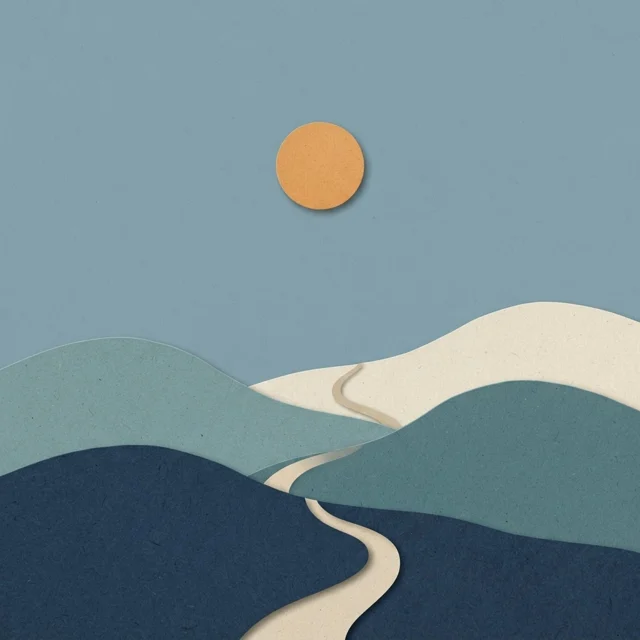
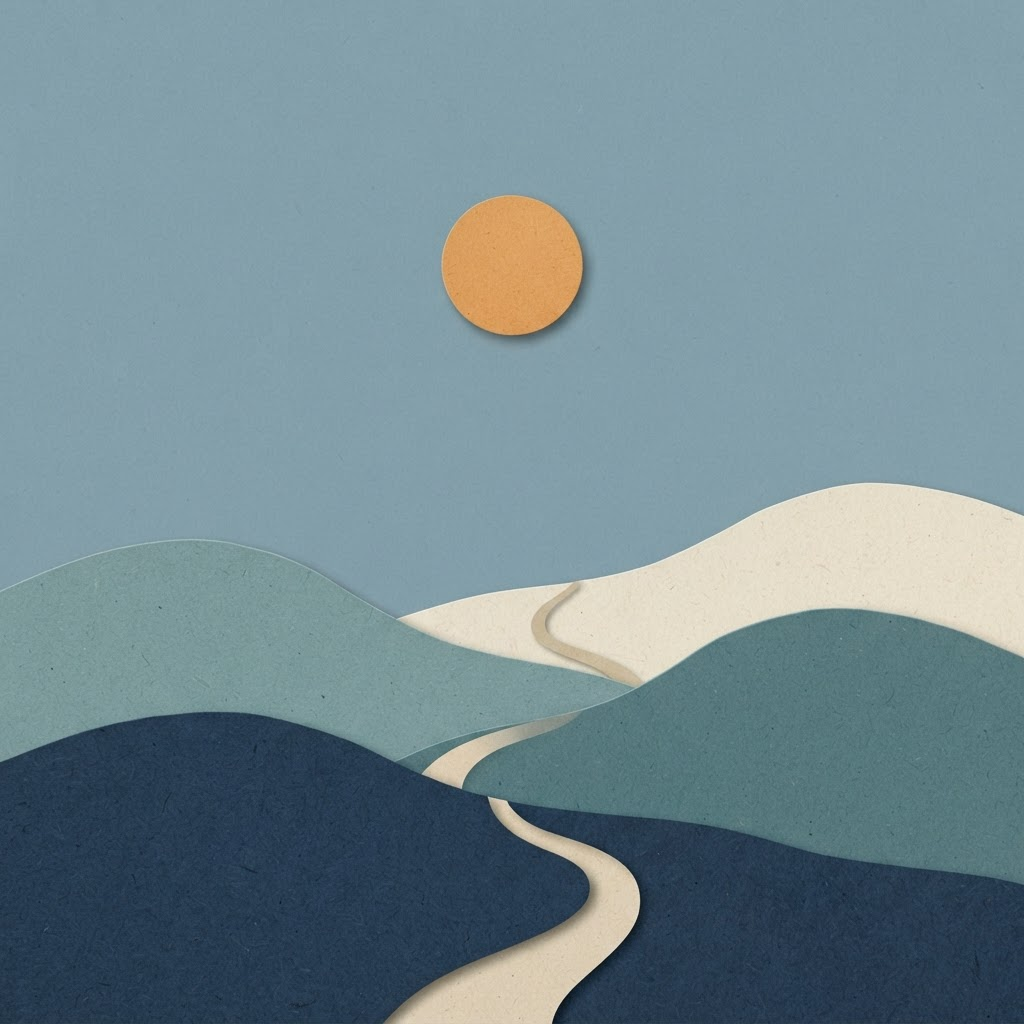
- Create a landscape illustration made from visible layers of cut paper. Show three rounded hills, a small winding path, and a single orange sun against a muted blue sky. Use cream, dusty teal, and deep navy for the paper layers, with soft shadows revealing their edges. Leave generous quiet sky above the hills. No people, buildings, written words, logos, or intricate decoration.DownloadSTEP 4
Inspect the destination layout
Check Nano Banana 2 Lite artwork from MemeGIF at its intended size. Compare outlines, object counts, and empty space before choosing a file or revising one written decision.
Features
Write a visible Nano Banana 2 Lite assignment
A Nano Banana 2 Lite brief should describe relationships you can see. MemeGIF gives you space to explain a main subject, supporting objects, viewpoint, and light direction.
Make the gardening card easy to describe
For the gardening card, make one red watering can the focal object and place a small green seedling beside it on a pale wooden bench. Give Nano Banana 2 Lite in MemeGIF a warm cream background, rounded shapes, and gentle shadows. Explain which objects belong and which should be absent. Count the returned objects and check their spacing; an appealing image with several extra tools no longer follows this deliberately simple assignment.
Translate mood into visible choices in MemeGIF
Calm or cheerful becomes useful when it leads to choices you can inspect. Ask Nano Banana 2 Lite on MemeGIF for generous spacing, limited colors, and a clearly separated silhouette when the card should feel quiet. For a more playful direction, explain rounded forms and a particular unexpected arrangement.
Plan Nano Banana 2 Lite artwork for small displays
MemeGIF keeps Nano Banana 2 Lite at 1K here. Give the image a readable main shape and inspect the delivered dimensions instead of assuming a universal square pixel size.
Keep the focal silhouette readable in MemeGIF
Reduce the gardening image to its intended card size before accepting the composition. Nano Banana 2 Lite artwork from MemeGIF should keep the can recognizable and the seedling distinct from the bench. Keep the subject away from likely crop edges, and request a simpler setting when surrounding forms compete with its shape.
Inspect small details in the MemeGIF result
Look for broken edges, unwanted marks, and repeated patterns that become confusing at display size. With Nano Banana 2 Lite in MemeGIF, a few visible paper fibers may communicate material better than texture across every surface. Proofread any lettering that appears, even when your prompt asked for none. Keep essential information in surrounding layout text when it would be too small or difficult to control inside the generated picture.
Explore Nano Banana 2 Lite materials with MemeGIF
Tell Nano Banana 2 Lite how the picture should look made. In MemeGIF, material, edges, and palette can connect a visual treatment to a specific scene.
Describe the paper landscape as a material
For the landscape example, describe visible cut-paper layers, three rounded hills, and soft shadows revealing their edges. Tell Nano Banana 2 Lite on MemeGIF where the winding path travels and leave generous sky above the hills. Name cream, dusty teal, and deep navy as the layer colors rather than mixing many unrelated treatments. Review whether the surfaces read as a coherent illustration, without mistaking the depicted layers for separately editable output.
Give the MemeGIF palette a hierarchy
Give the orange sun a clear role against muted blue sky. Nano Banana 2 Lite in MemeGIF can receive color relationships as well as individual color names: which area is subdued, which object attracts attention, and where contrast should remain gentle. Examine the returned balance before extending the idea. If the sun dominates every other element or disappears among warm hills, revise that relationship instead of adding another long list of hues.
Compare Nano Banana 2 Lite briefs deliberately
Use each Nano Banana 2 Lite request to answer a design question. MemeGIF creates a new interpretation from the next brief; other details can change alongside your chosen variable.
Change one decision in the written brief
Retain the main subject while comparing a closer viewpoint with a wider one, or keep the frame while simplifying the background. Nano Banana 2 Lite on MemeGIF receives a fresh written prompt for each attempt. Carry forward the details that still matter; previous output is not supplied as an editing reference here. Inspect the whole result because changing one instruction can also affect other objects, lighting, or placement.
Keep MemeGIF alternatives comparable
Choose whether you need to compare mood, framing, or material before requesting another set. MemeGIF offers one to four Nano Banana 2 Lite outputs, but quantity is an inspection choice rather than a promise of an ideal version. Keep each useful prompt with the selected image and note the decision it answered.
Place Nano Banana 2 Lite artwork in a layout
A Nano Banana 2 Lite concept can supply the image area of a design. MemeGIF does not produce a document with editable typography, shape layers, and final layout settings.
Reserve a usable area for the final message
The coastal cover needs a quiet upper portion where you can add the title later. Give Nano Banana 2 Lite in MemeGIF a small white house on a blue headland, a winding path, and restrained painted forms. Select a suitable portrait ratio in the controls rather than relying only on the word vertical. Place the returned image in the actual cover layout and check that clouds and other details leave usable space.
Label the MemeGIF concept by its purpose
The coastal town and text-generated objects are invented concepts. Review Nano Banana 2 Lite output from MemeGIF for accidental labels, landmarks, or construction details that could confuse that purpose. Use accurate source material and an appropriate editing workflow when a real item must remain identifiable; this text-only page does not anchor a revision to your product photograph. Keep the selected image and its brief together before finishing exact copy in your design application.
Example prompts
Text to image: layered paper landscape
Create a landscape illustration made from visible layers of cut paper. Show three rounded hills, a small winding path, and a single orange sun against a muted blue sky. Use cream, dusty teal, and deep navy for the paper layers, with soft shadows revealing their edges. Leave generous quiet sky above the hills. No people, buildings, written words, logos, or intricate decoration.
Text to image: a cheerful gardening card
Create a simple editorial illustration of one red watering can on a pale wooden garden bench. Place a small green seedling beside it and keep the background warm cream. Rounded geometric shapes, gentle shadows, a limited palette, and a clearly readable main silhouette. Keep the image uncluttered so it works at a small display size. No visible lettering, labels, brand marks, or additional tools.
Text to image: a fictional story cover concept
Create a vertical illustrated cover concept for a fictional story about a quiet coastal town. Show a small white house on a blue headland, one winding path, and soft clouds above a calm sea. Use textured painted shapes and a restrained blue, cream, and ochre palette. Leave the upper portion visually quiet for a title added later. Include no lettering, logos, real landmarks, or detailed map elements.
Workflow examples
Illustrative ways to plan, generate, and review your work.
MemeGIF workflow examples
Begin with a product photograph and a focused image-editing brief. Compare the draft with the original for shape, labels, and proportions before placing it into a listing. Add approved logos and exact copy in your design application.
Choose a video model and describe one small action, such as a careful object turn. Review the available duration, resolution, and credits. Check the completed take for object continuity and sound before using it in a larger edit.
Give the image workspace a subject, viewpoint, and visual metaphor that supports your article. Preview the result inside the intended layout. Adjust the crop or composition when it competes with the headline or obscures an important detail.
Sign in and use Compress Image when a picture has the right dimensions but a large file size. Compression runs in the browser; input and output images are saved to your account. Compare the result before downloading individual files or a ZIP.
Paste a draft into Humanize AI and select Natural, Friendly, or Professional tone. Review the rewrite for meaning, names, figures, and technical terms. Copy or download the version you have checked; detector scores and publication outcomes are not guaranteed.
Record the palette, viewpoint, lighting, and subject scale in a reusable brief. Supply relevant references where the selected image model supports them. Compare the images together, then revise specific differences instead of assuming automatic campaign-wide consistency.
MemeGIF Pricing and Credit Plans
Cancel anytime
Trending face-swap templates cost 300 Credits per video, including full-length Bad Times and every available format. Other tools keep their own quotes. Existing MV tickets remain usable until their original expiry; new tickets are no longer sold.
Pay once annually; receive 1/12 of your annual Credits each month. The first allocation arrives after payment, then monthly. Tax included. Each allocation expires at the next subscription month or paid-year end.
Lite
50% off0.025 / credit
$14.9/month equivalent · Billed $179· Save $179.8
Annual total: 7,200 credits, issued monthly
Video Models


Image Models


- Includes MiniMax H3 and all premium models
- Up to 1 batch generation task
- Standard generation speed
- Standard generation success rate
- Standard customer support
- Commercial Use License
Standard
50% off0.017 / credit
$24.9/month equivalent · Billed $299· Save $299.8
Annual total: 18,000 credits, issued monthly
Video Models
Image Models
- Includes MiniMax H3 and all premium models
- Up to 4 batch generation tasks
- Priority processing speed
- High generation success rate
- Priority customer support
- Commercial Use License
Pro
50% off0.014 / credit
$49.9/month equivalent · Billed $599· Save $599.8
Annual total: 43,200 credits, issued monthly
Video Models
Image Models
- Includes MiniMax H3 and all premium models
- Up to 10 batch generation tasks
- Fastest generation speed
- High generation success rate
- Dedicated account manager
- Commercial Use License
Max
50% off0.012 / credit
$99.9/month equivalent · Billed $1,199· Save $1,199.8
Annual total: 96,000 credits, issued monthly
Video Models
Image Models
- Includes MiniMax H3 and all premium models
- Up to 10 batch generation tasks
- Fastest generation speed
- High generation success rate
- Dedicated account manager
- Commercial Use License
Pay safely and securely with























FAQ
Frequently asked questions
Can Nano Banana 2 Lite edit a photograph on MemeGIF?
This Nano Banana 2 Lite selection is text-only. MemeGIF accepts no editing references for it, so describe a new scene in words. Choose a model with image editing when a supplied photograph needs to define the subject or the requested change.
Which size and format does Nano Banana 2 Lite use here?
MemeGIF configures Nano Banana 2 Lite at fixed 1K with PNG output. The default frame is square, but other supported ratios change its shape. Check the delivered file dimensions for your placement; there is no 2K or 4K tier for this selection.
How do I revise Nano Banana 2 Lite artwork?
Change the written brief and make a new Nano Banana 2 Lite request in MemeGIF. Restate the important subject and visual relationships because the earlier image is not an input here. Compare the complete new interpretation rather than expecting a precise before-and-after edit.
Can Nano Banana 2 Lite reproduce a real product exactly?
A Nano Banana 2 Lite text description is not an exact-product guarantee. Use MemeGIF for an invented object or illustration concept when that fits the task. For a real item, use appropriate accurate references and check its defining features before associating artwork with it.
Does Nano Banana 2 Lite have a fixed completion time?
No fixed completion time is promised by MemeGIF for Nano Banana 2 Lite. Requests need provider processing and network access. Review the workspace status and inspect the returned result, allowing for a request that takes longer than another instead of planning around an instant finish.
Can Nano Banana 2 Lite include a heading?
You can describe short wording for Nano Banana 2 Lite in MemeGIF, but inspect each returned character and its position. Reserve space and add final copy in a design editor when spelling, alignment, or later typography changes must remain under your direct control.
Where do I check Nano Banana 2 Lite outputs and credits?
MemeGIF lets you request one to four Nano Banana 2 Lite images and shows the current credit quote. Review the selected count and frame before submitting. Sign in with sufficient credits, then inspect the result before paying for another request with revised wording.
CTA
Plan a text-led image with MemeGIF Nano Banana 2 Lite
Bring a paper landscape, a gardening card, or a coastal cover idea to MemeGIF. Give Nano Banana 2 Lite a clear brief, review framing and credits, and inspect the actual artwork before finishing its layout.
Start from a Text Prompt