 MemeGIF
 Hailuo 2.3 Pro for readable gestures and grounded interactions
Focus on a moment the viewer can follow: a glance toward a doorway, an object meeting a table, or a garment settling after a turn. Hailuo 2.3 Pro on MemeGIF starts in text mode with a six-second, 1080p request configuration. Choose words or switch to one opening image, then judge the complete performance rather than its best frame.
Video workspace
The wooden elevator opens
28/33View prompt
Five-second continuous frontal shot of closed wooden elevator doors opening slowly to reveal one adult woman standing inside. Keep the camera fixed at eye level and the woman relaxed, facing forward. Preserve a simple, balanced composition with warm wood grain and soft interior light. End with the doors open and the woman still standing.
Introduction
Choose the Hailuo 2.3 Pro starting material in MemeGIF
Hailuo 2.3 Pro is a MiniMax video model used here for text and image requests through fal. MemeGIF is an independent platform, not MiniMax's official website.
Give the scene a beginning, not an album
Text mode starts with your written description and takes no pictures. Switch Hailuo 2.3 Pro to image mode in MemeGIF when a particular pose or object should establish the opening. That route requires exactly one starting picture, not a reference collection or two endpoints. It guides the generated scene without guaranteeing that every facial feature, garment detail, or object remains unchanged.
Read the MemeGIF configuration before submitting
Hailuo 2.3 Pro has only a six-second duration and requested 1080p setting in this workspace. MemeGIF requires a prompt in both modes, up to 2000 characters. The image examples do not change the initial text mode. There is no ending-image input or existing-video upload; plan the gesture around the opening material rather than expecting a timeline to arrange footage.
How to use
How to work with Hailuo 2.3 Pro in MemeGIF
- PromptSTEP 1
Start from the right material
Open Hailuo 2.3 Pro in MemeGIF, initially in text mode. Write a scene without pictures, or switch to image mode with one required opening image and no ending frame.
- ModelHailuo 2.3 Pro1080p16:96sPromptSTEP 2
Describe the visible performance
Give Hailuo 2.3 Pro one gesture or interaction in MemeGIF. Keep the required prompt within 2000 characters, specifying camera behavior and how the action should settle.
- First frameLast frame
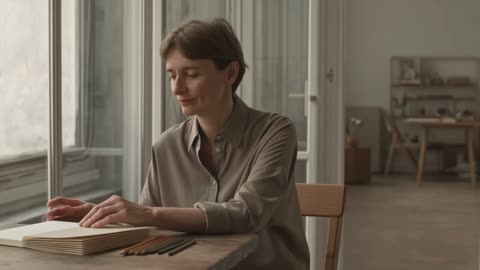 0.0s
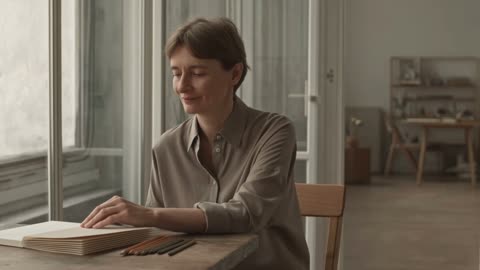 2.9s
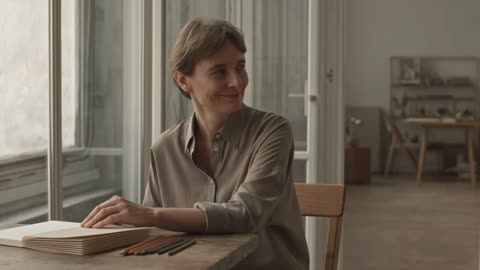 5.3sSTEP 3
Check the request before submission
Review Hailuo 2.3 Pro at the fixed six-second, requested 1080p configuration in MemeGIF. Check the opening image when applicable, choose one to four candidates, and inspect the displayed credits.
- Create one six-second medium shot of an adult illustrator seated beside a large studio window. They pause over a closed sketchbook, glance toward the doorway, and give a small natural smile. Keep the camera locked and the window light consistent. Make the gesture restrained and readable. No speaking, extra people, changing furniture, exaggerated movement, or cuts.DownloadSTEP 4
Evaluate and refine the motion
Watch the Hailuo 2.3 Pro result from MemeGIF continuously, then inspect gesture, contact, and clothing through the action. Compare with your brief before defining one focused revision.
Features
Shape a Hailuo 2.3 Pro gesture in MemeGIF
Translate the feeling into something observable. Give Hailuo 2.3 Pro a compact performance in MemeGIF, with framing that makes its important change visible.
Make the illustrator's recognition readable
The studio example asks an adult illustrator to pause over a closed sketchbook, glance toward a doorway, and give a small smile. Give Hailuo 2.3 Pro those visible cues rather than the abstract word confidence. In MemeGIF, keep the window light and camera stable so the gesture carries the scene. A new person entering would change the assignment rather than clarify the recognition.
Frame the important gesture in MemeGIF
A glance needs a visible face; lowering an object needs room around the hands and table. Choose the Hailuo 2.3 Pro composition for the action rather than asking a distant figure to communicate a subtle expression. Inspect the MemeGIF result for eye direction, posture, and the complete movement. A readable opening alone does not establish that the gesture stays coherent.
Check Hailuo 2.3 Pro contact and weight
Describe the starting hold, movement, and resting surface. Use Hailuo 2.3 Pro in MemeGIF for an interaction you can inspect rather than several simultaneous exchanges.
Give the held object a clear resting place
A notebook lowered onto a table is easier to follow than several objects changing hands. For the supplied interaction example, tell Hailuo 2.3 Pro to move only the item already held toward the existing table. Keep that distinction explicit in MemeGIF. Identify the intended pace and final rest without introducing another prop or treating the instruction as a guarantee of exact physics.
Inspect Hailuo 2.3 Pro contact in MemeGIF
Pause where fingers meet the object, where its base touches the table, and when the hands release it. A Hailuo 2.3 Pro interaction can look persuasive overall while showing a brief intersection or changing grip. Compare those moments in MemeGIF with the opening picture. Reject floating bases or altered proportions, and simplify the action when a complicated movement obscures the contact you need.
Guide Hailuo 2.3 Pro from one frame in MemeGIF
Choose an opening pose that supports the intended movement. Hailuo 2.3 Pro uses one image here; MemeGIF does not offer a second frame to specify the ending.
Match the source framing to the movement
The garment example begins with an adult subject making a slight turn so the visible fabric moves and settles. Give Hailuo 2.3 Pro enough surrounding space for that motion, with the relevant cut and details clear in the source. In MemeGIF, name the clothing features to retain. A tight crop may suit a head turn but leave too little room to inspect a wider action.
Describe the resting state in MemeGIF
Request the garment to settle, the subject to relax, or the held object to rest on its support. For Hailuo 2.3 Pro, those are written directions rather than a supplied ending picture. Review how the MemeGIF result arrives at that state during the six-second shot. A useful final pose cannot excuse an abrupt jump, changing garment shape, or unstable movement immediately before it.
Give Hailuo 2.3 Pro a clear visual priority
Define the setting without making it compete with the action. Hailuo 2.3 Pro prompts in MemeGIF need a subject, viewpoint, and coherent light direction, not an inventory.
Arrange the text scene before adding motion
Place the illustrator beside the studio window with the closed sketchbook and a readable view toward the doorway. Give Hailuo 2.3 Pro only the surroundings needed to explain that pause and glance. Keep the MemeGIF brief organized around the performance instead of adding furniture and decorations that attract attention. The 2000-character allowance is a limit, not a reason to fill every part of the scene.
Keep competing changes quiet in MemeGIF
A stable viewpoint helps you judge a hand movement or gaze; a gentle approach can emphasize a stationary object. Tell Hailuo 2.3 Pro which change matters and restrain the others. MemeGIF provides no camera or style preset controls for this model, so express the direction in the prompt. Avoid combining a turning subject, circling camera, shifting light, and busy background when the gesture is the purpose.
Review Hailuo 2.3 Pro as a moving scene in MemeGIF
Watch the action continuously before inspecting individual frames. Judge Hailuo 2.3 Pro in MemeGIF by the whole performance, not an attractive pause or the requested resolution label.
Check the actual file and its continuity
Watch Hailuo 2.3 Pro at normal speed, then examine facial features, clothing edges, and object outlines through difficult motion. MemeGIF has no aspect-ratio selector for either mode here. A visible 16:9 summary is not a ratio control or a guarantee of delivered geometry. Inspect the downloaded file rather than treating the requested 1080p setting as proof of native resolution, exact pixels, or frame rate.
Choose a revision with one observable goal
Name a changing grip, exaggerated smile, or garment that fails to settle before revising Hailuo 2.3 Pro. MemeGIF offers one to four candidates as independent tasks, not a multi-angle sequence or finished film. Sign in with enough credits and check the quote before submitting. Requests need network-dependent provider processing, with inputs and results saved to your account. Keep the useful brief and change the specific problem.
Example prompts
Text: a small moment of recognition
Create one six-second medium shot of an adult illustrator seated beside a large studio window. They pause over a closed sketchbook, glance toward the doorway, and give a small natural smile. Keep the camera locked and the window light consistent. Make the gesture restrained and readable. No speaking, extra people, changing furniture, exaggerated movement, or cuts.
Image: a grounded object interaction
Use the uploaded image as the opening frame. Over six seconds, let the visible adult subject gently lower the object already held in their hands onto the existing table. Keep their appearance, clothing, and the item recognizable. Maintain believable contact and a stable camera. End with the object resting. Do not introduce additional objects or change the setting.
Image: fabric and a controlled turn
Start from the supplied image of the adult subject. Create a six-second shot in which they make a slight natural turn, allowing the visible garment to move gently and settle. Aim to preserve its cut, color, and visible details. Keep the camera and lighting stable. Avoid dramatic poses, new accessories, additional people, or a scene transition.
Workflow examples
Illustrative ways to plan, generate, and review your work.
MemeGIF workflow examples
Begin with a product photograph and a focused image-editing brief. Compare the draft with the original for shape, labels, and proportions before placing it into a listing. Add approved logos and exact copy in your design application.
Choose a video model and describe one small action, such as a careful object turn. Review the available duration, resolution, and credits. Check the completed take for object continuity and sound before using it in a larger edit.
Give the image workspace a subject, viewpoint, and visual metaphor that supports your article. Preview the result inside the intended layout. Adjust the crop or composition when it competes with the headline or obscures an important detail.
Sign in and use Compress Image when a picture has the right dimensions but a large file size. Compression runs in the browser; input and output images are saved to your account. Compare the result before downloading individual files or a ZIP.
Paste a draft into Humanize AI and select Natural, Friendly, or Professional tone. Review the rewrite for meaning, names, figures, and technical terms. Copy or download the version you have checked; detector scores and publication outcomes are not guaranteed.
Record the palette, viewpoint, lighting, and subject scale in a reusable brief. Supply relevant references where the selected image model supports them. Compare the images together, then revise specific differences instead of assuming automatic campaign-wide consistency.
MemeGIF Pricing and Credit Plans
Cancel anytime
Trending face-swap templates cost 300 Credits per video, including full-length Bad Times and every available format. Other tools keep their own quotes. Existing MV tickets remain usable until their original expiry; new tickets are no longer sold.
Pay once annually; receive 1/12 of your annual Credits each month. The first allocation arrives after payment, then monthly. Tax included. Each allocation expires at the next subscription month or paid-year end.
Lite
50% off0.025 / credit
$14.9/month equivalent · Billed $179· Save $179.8
Annual total: 7,200 credits, issued monthly
Video Models


Image Models


- Includes MiniMax H3 and all premium models
- Up to 1 batch generation task
- Standard generation speed
- Standard generation success rate
- Standard customer support
- Commercial Use License
Standard
50% off0.017 / credit
$24.9/month equivalent · Billed $299· Save $299.8
Annual total: 18,000 credits, issued monthly
Video Models
Image Models
- Includes MiniMax H3 and all premium models
- Up to 4 batch generation tasks
- Priority processing speed
- High generation success rate
- Priority customer support
- Commercial Use License
Pro
50% off0.014 / credit
$49.9/month equivalent · Billed $599· Save $599.8
Annual total: 43,200 credits, issued monthly
Video Models
Image Models
- Includes MiniMax H3 and all premium models
- Up to 10 batch generation tasks
- Fastest generation speed
- High generation success rate
- Dedicated account manager
- Commercial Use License
Max
50% off0.012 / credit
$99.9/month equivalent · Billed $1,199· Save $1,199.8
Annual total: 96,000 credits, issued monthly
Video Models
Image Models
- Includes MiniMax H3 and all premium models
- Up to 10 batch generation tasks
- Fastest generation speed
- High generation success rate
- Dedicated account manager
- Commercial Use License
Pay safely and securely with























FAQ
Frequently asked questions
What are the Hailuo 2.3 Pro settings on MemeGIF?
Hailuo 2.3 Pro starts in text mode with six seconds and a requested 1080p configuration. MemeGIF provides no other duration or resolution for this model, and no aspect-ratio selector in either mode. These are request settings, not proof of a returned file's exact dimensions, native resolution, or frame rate.
Can Hailuo 2.3 Pro use two endpoint images?
No. Hailuo 2.3 Pro image mode requires one opening picture and accepts no ending image. Describe the desired resting state in the MemeGIF prompt instead. That direction does not lock a final frame or reproduce the two-endpoint workflow offered by a different model; inspect the full movement and its conclusion.
Is an image necessary for Hailuo 2.3 Pro?
Only in image mode. Hailuo 2.3 Pro starts in text mode on MemeGIF, taking words without pictures. Both modes require a prompt of up to 2000 characters. Choose image mode for one supplied opening; neither mode accepts a video, audio file, or general album of reference images.
Does Hailuo 2.3 Pro guarantee a realistic human gesture?
No. Inspect Hailuo 2.3 Pro expression, anatomy, timing, and contact throughout the clip. Compare the MemeGIF result with the intended gesture and source when present. A convincing smile in one frame does not guarantee stable identity or coherent motion; simplify the action when the first direction proves too complicated.
Can I control audio in Hailuo 2.3 Pro?
There is no native-audio switch or audio-reference upload for Hailuo 2.3 Pro here. Plan the visual performance in MemeGIF without depending on promised generated dialogue or sound. Arrange required narration, music, and effects separately in your own production workflow; sound instructions are not an audio control.
How can I preserve an item in Hailuo 2.3 Pro?
Use a clear opening image and identify the item's important shape, finish, and markings. Keep Hailuo 2.3 Pro movement limited enough to inspect. Review the entire MemeGIF result against the source; written preservation goals do not lock pixels, prove hidden construction, or guarantee unchanged lettering and proportions.
Where can I review Hailuo 2.3 Pro credits in MemeGIF?
Check the workspace quote for the configured Hailuo 2.3 Pro request, including the input and candidate count, before submitting. MemeGIF requires login, enough credits, and network access, with inputs and results saved to your account. Review the amount again before another variation instead of assuming a fixed price or completion time.
CTA
Develop a clear Hailuo 2.3 Pro moment in MemeGIF
Bring an illustrator's glance, a grounded object interaction, or a controlled garment turn to MemeGIF. Choose the Hailuo 2.3 Pro starting mode, describe one readable movement, and review credits. Watch the complete result before deciding whether it belongs in your own editing sequence.
Create a Visual Performance