 MemeGIF
 Opus 5.5 Guide: Dark Tech Launch Film
Study the fictional Tidy launch film with MemeGIF. Review animated windows, type, source timing, and sound while distinguishing reference code from the web tool.
Start here: open MemeGIF Opus for a dark software-launch story.
Watch Room to Think, LemoLab’s finished Tidy film. Its subject is Tidy, a fictional application: interface clutter overwhelms a cursor, then one decisive action brings order. This is a code-animated launch film, not a screen recording, a real application demonstration, or evidence of MemeGIF product performance. The author documents a 42-second source project.
The Lemo-Opuscar authorship statement attributes the films to Claude Opus 5.5 writing code. We have not independently verified the author’s model sessions. The entry above is a starting point, not proof of a run or local-terminal access; the commands below require a separate coding environment.
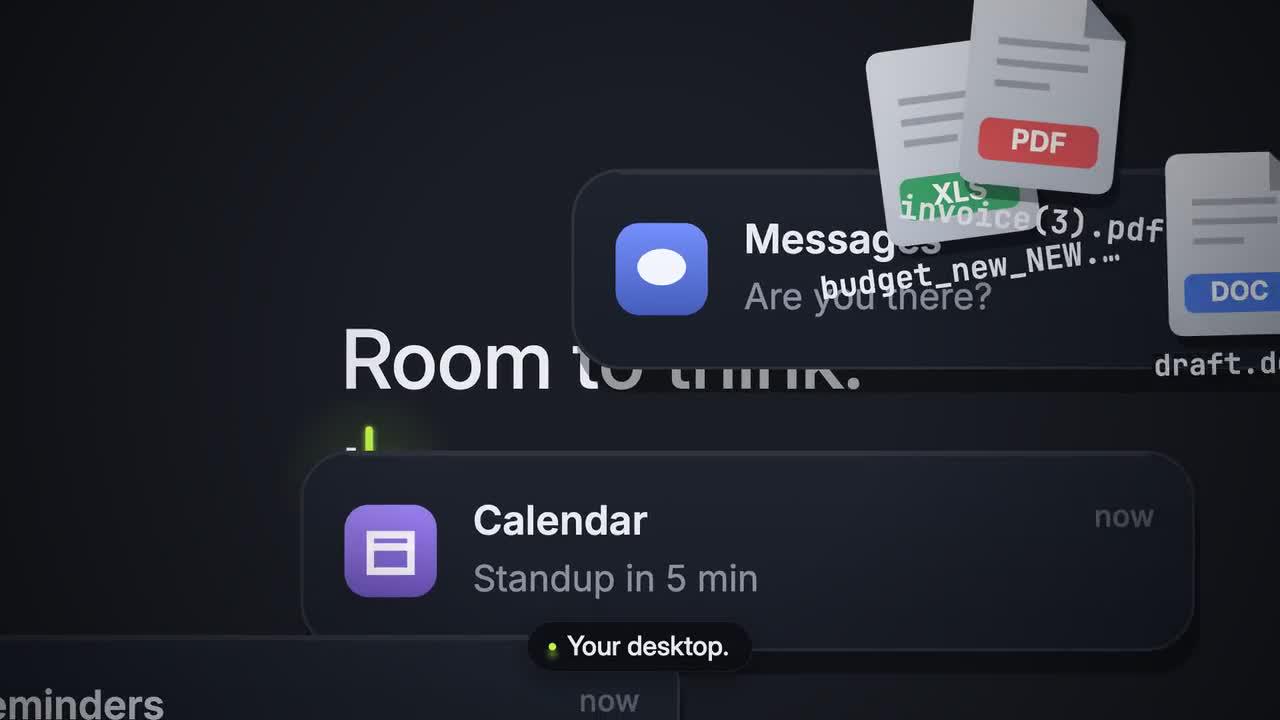
Original frame from Room to Think. Credit: LemoLab. Tidy and its interface are fictional.
1. Read the product story before touching the effects
The Dark Tech Keynote style specification centers the interface on a dark stage, with precise alignment and one dominant accent. The drama comes from disorder becoming order—not from showing a physical product or imitating another company’s desktop.
In the documented Tidy scene breakdown, hundreds of generated interface elements accumulate, the picture freezes, and the cursor initiates their organization. The authored generator contains 264 elements across several categories, not 264 independently verified application windows. Any numerical product claim inside this fictional film remains part of its demonstration narrative, not a benchmark measured here.
Keep the original MP4 untouched during the MemeGIF reference study. Watch once for the story and again for the cursor, reading holds, and sound. Keep this fictional case distinct from a real SaaS demonstration.
An MemeGIF software-launch brief starts with the product action the viewer should understand. In this reference, order follows a decisive press; the effects serve that change. For an MemeGIF concept, write the before state, action, and after state before describing glows or camera movement. This gives every decorative choice a purpose that can be checked in the candidate.
The MemeGIF story needs a visible reason for the audience to care about the action. Show the problem through accumulation and interruption, then let the resolution simplify the frame. During MemeGIF review, compare the visual density on both sides of the turning point. If the organized state remains equally chaotic, the product story has not become clear despite a polished transition.
Keep fictional demonstration content explicit in an MemeGIF project note. A number shown within a launch film can look like measured performance even when it belongs to the story. MemeGIF planning should identify that distinction before the number becomes a prominent visual. Retain the reference's qualifications rather than turning an animated claim into a statement about a live service.
2. Prepare the source and dependencies
Use an isolated workspace with Git, Node 20+, FFmpeg/ffprobe, and Python 3.11–3.13 or uv. The voice tier adds Kokoro and transcription checking. These are reader instructions, not commands run for this article. Reuse a reviewed existing clone rather than overwriting it.
git clone https://github.com/lemomo-ai/lemo-opuscar.git tidy-case
cd tidy-case
export LEMO_OPUSCAR_HOME="$PWD"
sh plugin/skills/lemo-opuscar/scripts/setup.sh deps voice
sh tools/fetch.sh instruments vcsl
mkdir -p evidence
D=styles/dark-keynote/demo
git rev-parse HEAD > evidence/tidy-commit.txt
npm ls --depth=0 > evidence/tidy-dependencies.txt
Retain package-lock.json, Python dependency versions, the original release file, and the demo’s CREDITS. Confirm that the demo source, fonts, voice model, and sample files exist before building. The VCSL fetch command supplies the sample bank used by this score; installation alone does not prove the complete build works.
For MemeGIF preparation, collect the source film, the product-story notes, and the intended visual rules separately. Keep a stable copy of the author release for comparison. Any MemeGIF candidate belongs beside its own submitted prompt and settings, so a collaborator can identify which result came from the website and which was produced through an external source renderer.
Inspect the MemeGIF concept's smallest important controls at the viewing size you expect people to use. The action button, cursor, and key label should remain recognizable while surrounding elements accumulate. MemeGIF references can be visually dense without making the central action tiny. Prioritize those anchors before adding more cards, windows, or background detail to the brief.
During an MemeGIF source study, document missing assets rather than judging their substitutes as if they were original. A fallback typeface can change alignment, while absent samples change the relationship between sound and picture. Record those differences in the MemeGIF comparison notes. Resolving them avoids revising the creative direction to compensate for an incomplete local environment.
3. Give the coding agent a reproduction brief
This is a new, copy-ready reproduction prompt, not the author’s original prompt:
Reproduce and study LemoLab's Room to Think from the existing dark-keynote
source. Read the actual commit, lockfiles, STYLE.md, DEMO.md, demo/CREDITS,
core/README.md, and demo/build.sh before changing anything.
Preserve Tidy as a fictional app. Keep the cursor-led clutter-to-order story,
dark stage, original interface elements, shared music/visual cues, and author
credits. Do not insert real-product screenshots, invented benchmarks, or claims
that an actual desktop was sorted. Do not call external media-generation APIs.
Inspect timeline.js, world.js, film.js, the engine, voice lines, score, and mix.
First identify missing dependencies and explain the source's build sequence.
Keep 42 seconds and 24 fps only if the checked-out source agrees. Report any
mismatch with the downloaded release instead of silently changing its timing.
Review the source and assets, then render through the documented script.
Use absolute render(t), stable element identities and destinations, and the
shared note/event tables. Check the cursor press, element flights, grid landing,
reading holds, captions, voice clarity, and the ending. Test reverse seeks.
Record actual model/provider/effort, prompts, code diffs, and real output checks.
Never claim our reproduction passed merely because the author published a film.
Do not publish or present the reconstruction as an original MemeGIF production.
For the MemeGIF source study, use one shared timing source: separate picture and score approximations can disconnect the sorting action.
Another frame extracted from the author’s release. Use the full film, rather than this still alone, to assess motion and timing.
Use the reconstruction prompt for the external code study and a separate MemeGIF creative request for a new film. The website's available controls determine the submitted workflow. Before requesting an MemeGIF result, inspect those controls and the credit estimate, then preserve the exact prompt and references actually used. This creates a clear record without implying local-script execution.
An MemeGIF dark-interface brief should reserve the accent for the element that carries the action. Neutral surfaces can establish hierarchy through brightness and spacing. If every card glows, the viewer loses the main cue. During MemeGIF selection, compare the cursor, action control, and resolved state; each should lead attention at the moment the story needs it.
Describe the MemeGIF camera's purpose at each beat. A pull-back reveals accumulation, a closer view prepares the action, and a wide landing shows its consequence. MemeGIF revisions should preserve that information sequence. Adding an arbitrary zoom may increase energy while hiding the very change that the launch film is meant to explain.
4. Build through the case’s own script
After dependency and rights checks, use the Tidy reproduction script:
sh styles/dark-keynote/demo/build.sh
It exports the note timeline, creates and checks narration, builds the score, exports visual events, checks cues, mixes sound, writes subtitles, renders at 24 fps with two workers, and muxes the final film. It also produces review images. Do not substitute Remotion flags or another style’s renderer.
Regenerated speech still needs listening in the MemeGIF reference study. Check words, timing, and the intended silence before the decisive action. The script tolerates failure of its final ASR spot-check, so a successful shell completion is not comprehensive acceptance. Read that report and replay the sound yourself.
Review MemeGIF sound and picture together through the decisive action. The pause establishes anticipation, and the return of sound should connect to the visible press. If the motion and sound feel unrelated, note the actual mismatch. An MemeGIF correction should name the cue relationship instead of requesting a generally more cinematic soundtrack.
During MemeGIF reading review, identify the point when each important line becomes fully visible and the point when it disappears. Moving type and lighting can reduce the usable reading hold. Keep an MemeGIF candidate that lets the audience understand the message without stopping playback; attractive typography should remain understandable in the actual moving sequence.
MemeGIF preview review should include the quiet sections as well as the climax. A dark frame can hide missing elements or clipped captions that become apparent on another display. Watch the MemeGIF candidate at ordinary brightness and at its intended size. Check the product reveal, status area, and final sentence before judging the export complete.
5. Correct observed problems without changing the case
Save actual review frames for the MemeGIF source study:
node core/render/still.mjs "$D" 0 14.9 16.45 26 41.9 \
--out evidence/tidy-stills
These are samples in seconds. Inspect adjacent frames around the press and landing, and check missing fonts or assets.
Correct only the observed flight, alignment, caption, or sound problem. Preserve
Tidy's fictional status and the existing story. Trace destinations and timings
to their shared source; do not hide gaps with a cut. Keep captions outside the
important UI. Show the diff, rerun affected checks, and replay the whole action.
If Chromium fails, inspect Lemo’s browser configuration rather than inventing a new runtime. If sound is missing, resolve the named sample or voice dependency; do not quietly deliver a silent substitute.
For an MemeGIF sorting-action correction, follow a recognizable element from the clutter into its final destination. Inspect the path, identity, and landing. A brief flash can conceal duplication or an unexplained replacement. MemeGIF revisions should preserve the visible cause and consequence of the action, rather than covering a confusing flight with a cut.
Check the MemeGIF resolved layout against the story's visual promise. Rows should feel organized, spacing should be consistent, and the main control should remain readable. If a caption obscures that control, adjust its placement or the composition. After an MemeGIF revision, inspect both the corrected region and neighboring elements so improved alignment does not introduce new overlaps.
Save the observed MemeGIF defect with a timestamp or a frame reference and a short expected-behavior note. That makes a bounded revision easier to compare against the earlier candidate. MemeGIF feedback such as a cursor landing outside its action control is more useful than an unspecified request for better animation, because the result can be accepted or rejected visibly.
6. Verify the MP4 and preserve attribution
ffprobe -v error -count_frames -show_streams -show_format -of json \
styles/dark-keynote/dark-keynote.mp4
ffmpeg -v error -i styles/dark-keynote/dark-keynote.mp4 -f null -
For the unchanged documented source, 42 seconds at 24 fps implies 1,008 picture frames. Verify the actual dimensions, rate, audio, and ending; do not assume a web-compressed release and local render are byte-identical. Watch the complete export, including the quiet moments and credits, during the MemeGIF source study.
Author-film reference frame. Keep its source attribution separate from any locally reproduced review output.
Archive the editable project, source commit, dependencies, prompts, human changes, and reviewed MP4. Lemo’s code is MIT; this case’s fonts retain OFL notices, VCSL samples are credited as CC0, and the voice components have separate licenses. Preserve the Tidy asset-credit record, rather than treating the whole film as an uncredited template.
Before accepting an MemeGIF launch film, watch it continuously and explain its product action afterward. If the viewer remembers only the light sweep, refine the action sequence or message hold. The MemeGIF export should make the before-and-after relationship clear, while retaining the fictional reference's attribution and avoiding unsupported claims about a real product's measured performance.
The MemeGIF handoff should include the selected file, its prompt, settings, inputs, and unresolved review notes. Keep any external source reconstruction independently labeled with its build evidence. A recipient should identify the MemeGIF result without guessing from the appearance of the film. Preserve the author release as the reference rather than replacing it with a revised candidate.
Reopen the MemeGIF export and check the final sentence, audio tail, and closing composition. The smallest ending can carry the film's resolution, so losing it changes the story. Give the MemeGIF collaborator the exact selected version and the reason it was accepted; that record supports later adaptations without treating the source demonstration as a verified product benchmark.