 MemeGIF
 Storyboard Guide: Nine Panels with GPT-Image-2
Plan a nine-panel storyboard with MemeGIF. Define the shot sequence, check character and prop continuity, and use the supplied prompt as a starting brief.
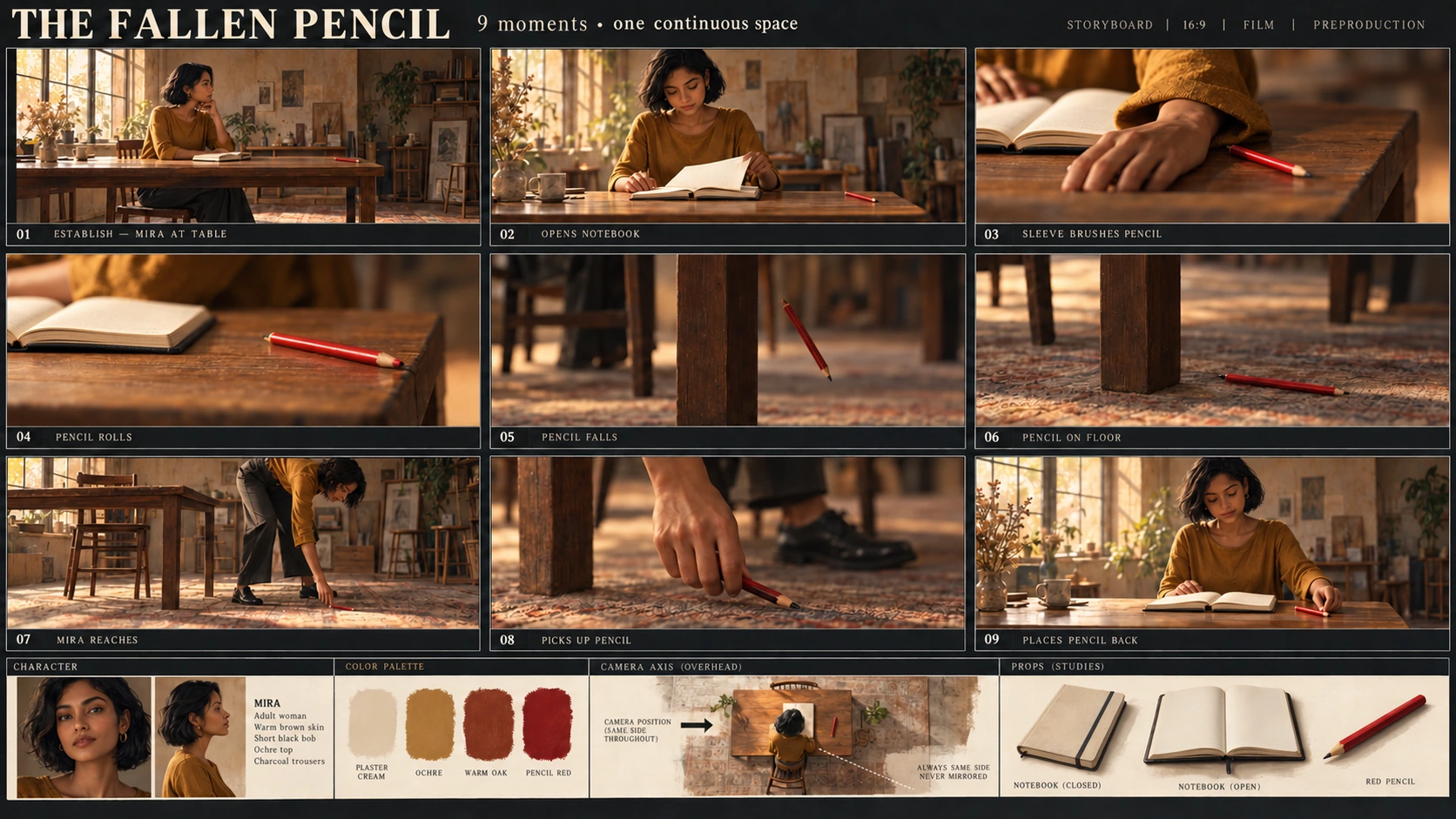
MemeGIF storyboard review follows the action as well as appearance. A sleeve accidentally brushing a pencil differs from a finger pushing it; a pencil falling beside a table leg should not reappear beneath the table’s center.
This MemeGIF walkthrough plans a small event: Mira opens her notebook, accidentally knocks a pencil off the table, retrieves it, and puts it back. Deliver one nine-panel image and its action plan.
The illustrations are Codex-generated teaching materials, not MemeGIF test outputs. They show a scene reference, an observed contact error in a teaching candidate, and a focused revision.
1. Define the character, setting, and reference image’s role
Keep the scene simple enough to check.
For the MemeGIF brief, Mira is an original adult woman with warm brown skin, a short black bob, an ochre long-sleeved top, and charcoal trousers. She sits on the viewer’s left facing a wooden table, with one wooden chair, one cream notebook, and one red pencil.
The starting state has a closed notebook and the pencil near the table’s right edge.
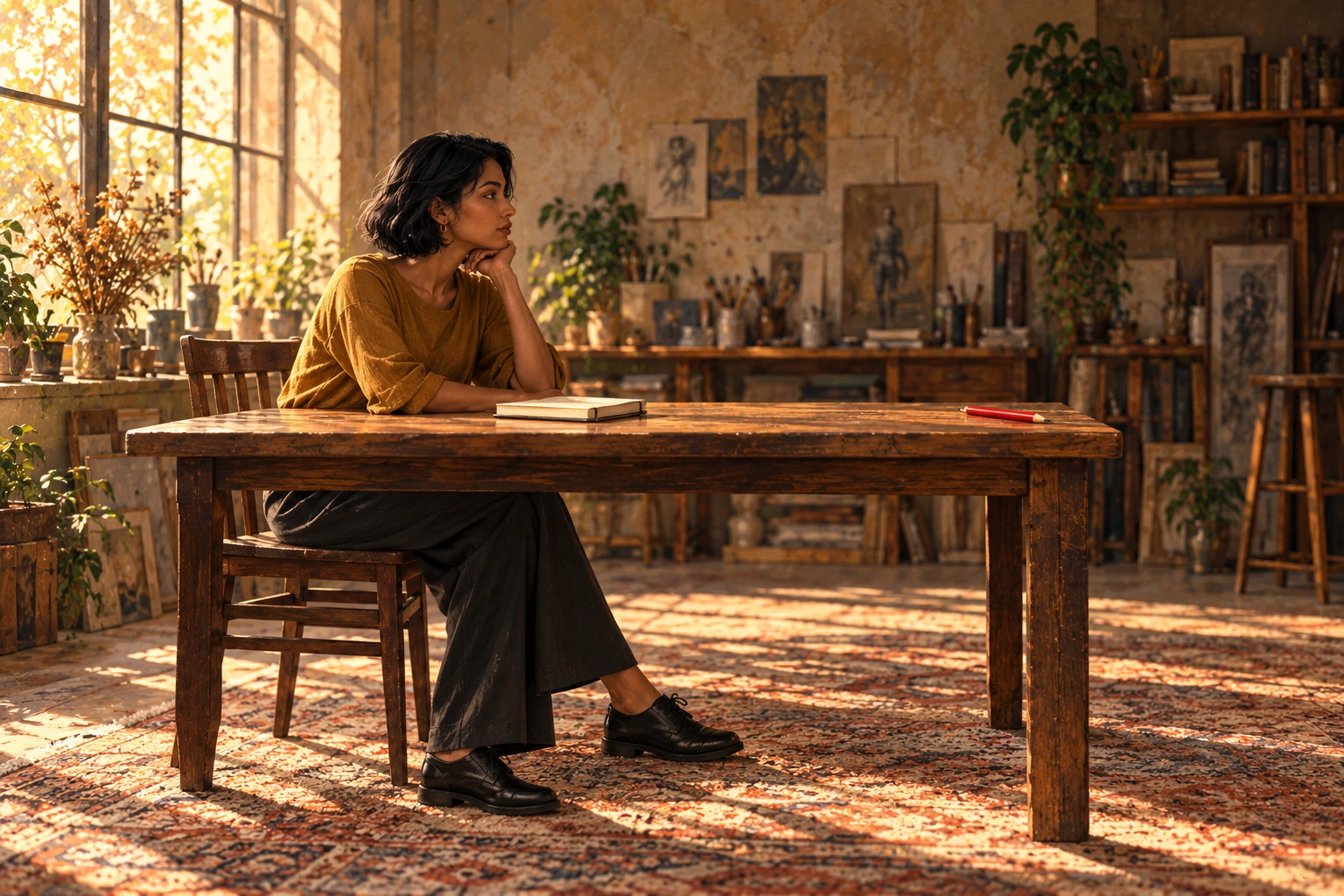
Codex-generated teaching reference for Mira’s appearance and the starting layout. It is not an MemeGIF output.
The MemeGIF reference establishes appearance and starting arrangement. The action plan must explain when the notebook opens, what knocks the pencil, and where Mira moves to retrieve it.
Begin the MemeGIF workflow in Text to Image. Viewing the illustration does not attach it: describe character and room in the prompt. In a later Image to Image revision, upload the actual reference file.
2. Write nine action states before generating nine pictures
Read your sheet left to right, then top to bottom:
01–03 across the first row, 04–06 across the second, and 07–09 across the third.
StudioBinder explains how to organize the action in a shot list alongside framing and camera details. For this MemeGIF exercise, also record pencil location and notebook state.
| Panel | Action and suggested framing | Required state |
|---|---|---|
| 01 | Wide view: Mira sits at the table, ready to begin. | Notebook closed; one red pencil near the right table edge. |
| 02 | Medium view: she opens the notebook. | Notebook open; pencil remains on the tabletop. |
| 03 | Close-up: her sleeve cuff brushes the pencil while she adjusts the pages. | The sleeve makes contact. Her fingers are not pushing the pencil. |
| 04 | Close-up: the pencil rolls toward the right edge. | Pencil still on the tabletop, approaching the edge. |
| 05 | Detail: the pencil falls. | Pencil in midair to the viewer’s right of the visible right-hand table leg. |
| 06 | Low detail: the pencil has landed. | Pencil on the floor immediately to the right of that leg. |
| 07 | Medium view: Mira has left her chair and moved to the table’s right end. She bends and reaches down with an empty hand. | Pencil remains at the landing spot; she has not picked it up yet. |
| 08 | Hand detail: she lifts the pencil. | One pencil in her hand; no duplicate left on the floor. |
| 09 | Medium view: Mira returns to her seat and places the pencil beside the notebook. | Notebook still open; one pencil on the tabletop; none on the floor. |
Use the visible right-hand table leg to connect Panels 05–08 in your MemeGIF review. “Right” means within each view, with the camera on the same side of the action, not the panel’s position on the sheet.
These MemeGIF frames represent nine illustrated moments. Several might later share a continuous shot; numbering does not require a cut between every panel.
3. Set up the whole sheet in MemeGIF
Open MemeGIF to plan a nine-panel visual sequence.
The checked MemeGIF interface uses Text to Image, GPT Image 2, Auto, 1K, JPEG, and x1. Explicitly change Auto to 3:2.
| Setting | Choice for this example |
|---|---|
| Mode | Text to Image |
| Model | GPT Image 2 |
| Aspect ratio | 3:2 landscape, selected instead of Auto |
| Resolution preset | 1K |
| Output format | JPEG |
| Output count | x1 |
MemeGIF’s 3:2 ratio and resolution preset apply to the whole contact sheet, not each panel. Gutters, borders, and labels reduce the area available to individual illustrations.
The teaching images are separate editorial assets. Their dimensions and format do not establish the dimensions or export options of MemeGIF’s 1K output.
Copy the complete storyboard prompt
Create one static 3:2 landscape storyboard contact sheet containing exactly nine panels.

Layout:
Use three equal columns and three equal rows, with clear gutters separating the panels.
Read left to right, then top to bottom.
Label the panels exactly once each:
01, 02, 03 in the top row.
04, 05, 06 in the middle row.
07, 08, 09 in the bottom row.

Place each number clearly inside its own panel without covering the action.
Do not add a title, dialogue, captions, or other text.

Character:
Mira is one original adult woman with warm brown skin, a short black bob, an ochre long-sleeved top, and charcoal trousers.
Keep her appearance and clothing consistent wherever visible.

Setting:
A simple wooden table and one wooden chair.
Mira begins seated on the viewer's left, facing right toward the table.
There is one cream notebook and exactly one red pencil.
The notebook starts closed.
The pencil starts near the right edge of the tabletop.

Maintain the same basic room orientation throughout.
Closer framing and lower viewing angles are allowed, but do not mirror the scene.
Use the visible right-hand table leg as the landmark for the pencil's fall and landing.
Viewer-left and viewer-right refer to positions inside each panel.

Panel 01:
Wide view. Mira sits at the table.
The cream notebook is closed.
One red pencil rests near the right edge of the tabletop.

Panel 02:
Medium view. Mira opens the notebook.
The pencil remains on the tabletop near the right edge.

Panel 03:
Close-up of the accidental contact.
As Mira adjusts the open notebook's pages, the cuff of her ochre sleeve brushes the red pencil.
Show the sleeve touching the pencil.
Her fingers must not push, point against, or deliberately flick the pencil.

Panel 04:
Close-up. The red pencil rolls toward the right edge.
It is still on the tabletop.
Show one pencil, not several ghosted positions.

Panel 05:
Detail view. The pencil has left the tabletop and is falling through the air.
Place it to the viewer's right of the visible right-hand table leg.
There is no pencil remaining on the tabletop.

Panel 06:
Low detail. The red pencil lies on the floor immediately to the viewer's right of the same table leg.
Keep the landing location consistent with Panel 05.

Panel 07:
Medium view. Mira has left the chair and moved to the right end of the table.
She bends toward the landing spot and extends an empty hand toward the pencil.
The pencil is still on the floor to the right of the right-hand table leg.
Do not leave Mira seated on the left.
Do not move the pencil beneath the center of the table.

Panel 08:
Close-up. Mira's hand holds the one red pencil above the landing spot.
The floor below is empty.
Do not leave a second pencil on the ground.

Panel 09:
Medium view. Mira is seated on the left again, facing the table.
The cream notebook remains open.
She has placed the one red pencil on the tabletop beside it.
There is no pencil on the floor.

Visual treatment:
Use clear storyboard illustrations with restrained color and readable actions.
Keep the red pencil easy to identify.
Use a richly textured, warmly lit atelier background with consistent furniture construction. Keep decorative background details subordinate to the action.
Frame close-ups to show the relevant contact or location; Mira's face does not need to appear in every panel.

Continuity rules:
The notebook remains open from Panel 02 onward.
There is only one physical pencil in each depicted moment.
Do not duplicate the pencil to suggest movement.
Keep the chair on the original side of the table.
Do not add another person, duplicate pencils, or extra notebooks. Background studio props may remain, but must not obscure or change the action.
Paste the prompt, confirm MemeGIF settings, and review the displayed credit amount before submitting. Save candidate, prompt, and settings together.
Treat this MemeGIF prompt as a specification to inspect. It cannot guarantee every object, position, or action survives correctly.
4. Read the candidate as a sequence, not a collection
Count nine panels and check labels in the MemeGIF candidate. Then read the pictures without relying on the action table to explain unclear gestures.
The teaching candidate below illustrates a contact error for review in Panel 03.
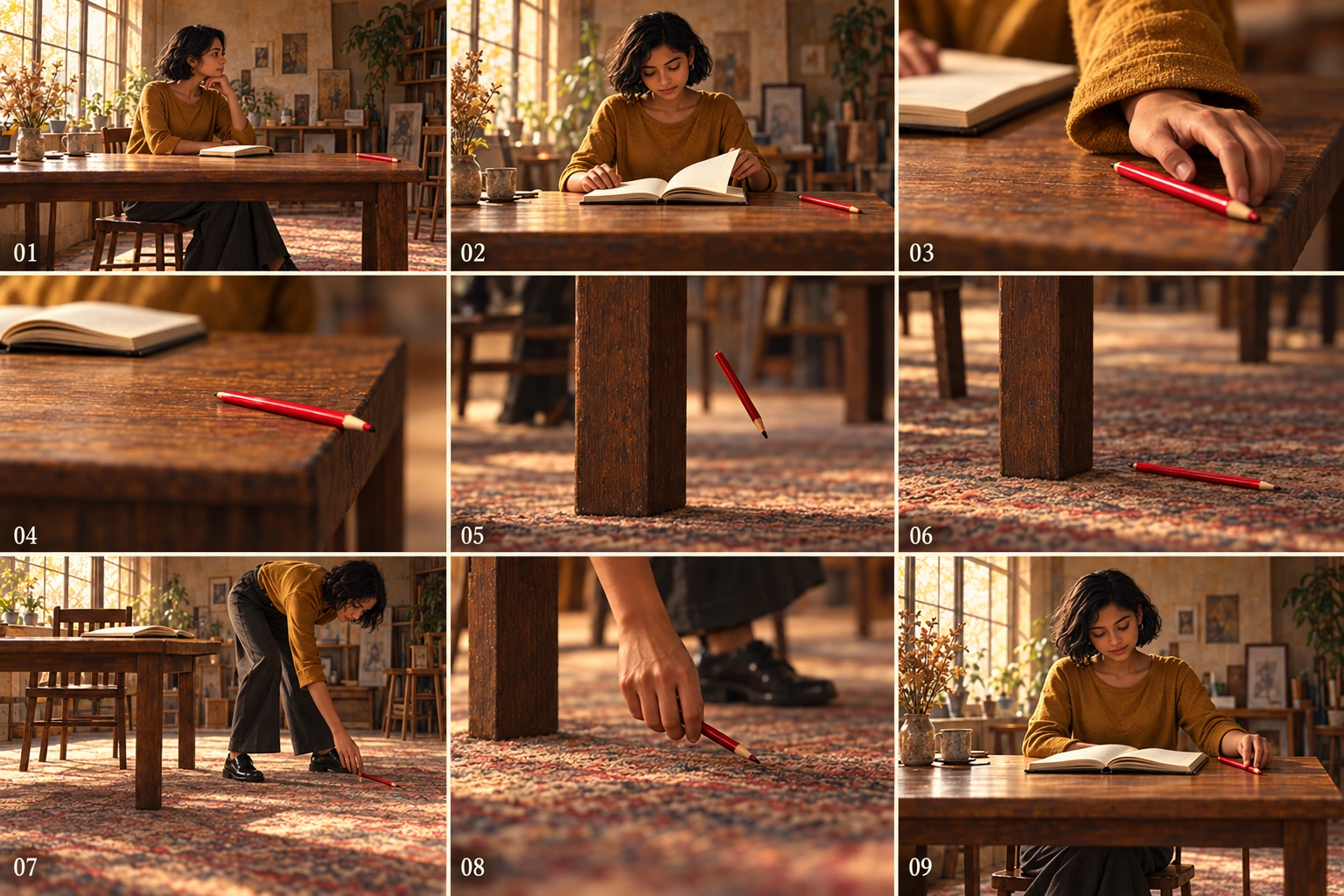
Codex-generated teaching candidate. These deviations belong to the illustration, not MemeGIF test results or an MemeGIF failure-rate measurement.
Check the cause in Panel 03
During MemeGIF review, distinguish accidental sleeve contact from the candidate’s deliberate-looking finger push.
Correct the cause in the instructions; asking for a “more natural hand” does not specify the intended contact.
Follow the fall and retrieval from Panels 05 to 08
The teaching candidate retains the fall and landing right of the table leg, and Mira’s move toward it. In MemeGIF, preserve those relationships when correcting Panel 03.
Follow the table landmark through falling, landing, reaching, and pickup in your MemeGIF sheet. A closer crop changes framing; it should not move the pencil or leave a duplicate.
Track object states across all nine panels
Track the pencil independently of Mira during MemeGIF review:
Tabletop → sleeve contact → rolling → falling → floor → empty-hand reach → hand → tabletop.
Then check the MemeGIF notebook: closed in 01, open from 02 onward.
Review the whole MemeGIF sequence for duplicate pencils, unexplained notebook closure, changed clothing, extra limbs, and shifting furniture—even if only one frame looks obviously wrong.
5. Make focused corrections from a saved version
Keep the first MemeGIF candidate. Switch to Image to Image, upload the chosen version, or repair the sequence from an existing sheet through the separate editing entry.
Match the MemeGIF correction to the observed continuity problem. Avoid combining it with a complete restyling.
For the Panel 03 correction, use:
Edit the uploaded nine-panel storyboard.

In Panel 03, show the cuff of Mira's ochre sleeve making contact with the red pencil as she adjusts the notebook pages.
Keep her fingers away from the pencil so they do not push or flick it.

Preserve the panel number, the open notebook, the character design, and the overall sheet layout.
Keep the other eight panels unchanged.
Do not add objects or text.
Asking MemeGIF to retain other panels expresses intent; it does not lock their regions.
For other MemeGIF position errors, use similarly bounded instructions:
| Target | Correction to request |
|---|---|
| 05: falling pencil | “Use Panel 06’s landing location as the reference. In Panel 05, place the single pencil in midair to the viewer’s right of the visible right-hand table leg. Keep the table orientation consistent.” |
| 07: retrieval position | “Show Mira out of her chair at the table’s right end, bending and extending an empty hand toward the pencil. Keep the pencil on the floor to the right of the right-hand leg. Do not move it beneath the table’s center.” |
Compare the MemeGIF revision against your saved baseline. Inspect unaffected frames before accepting it.
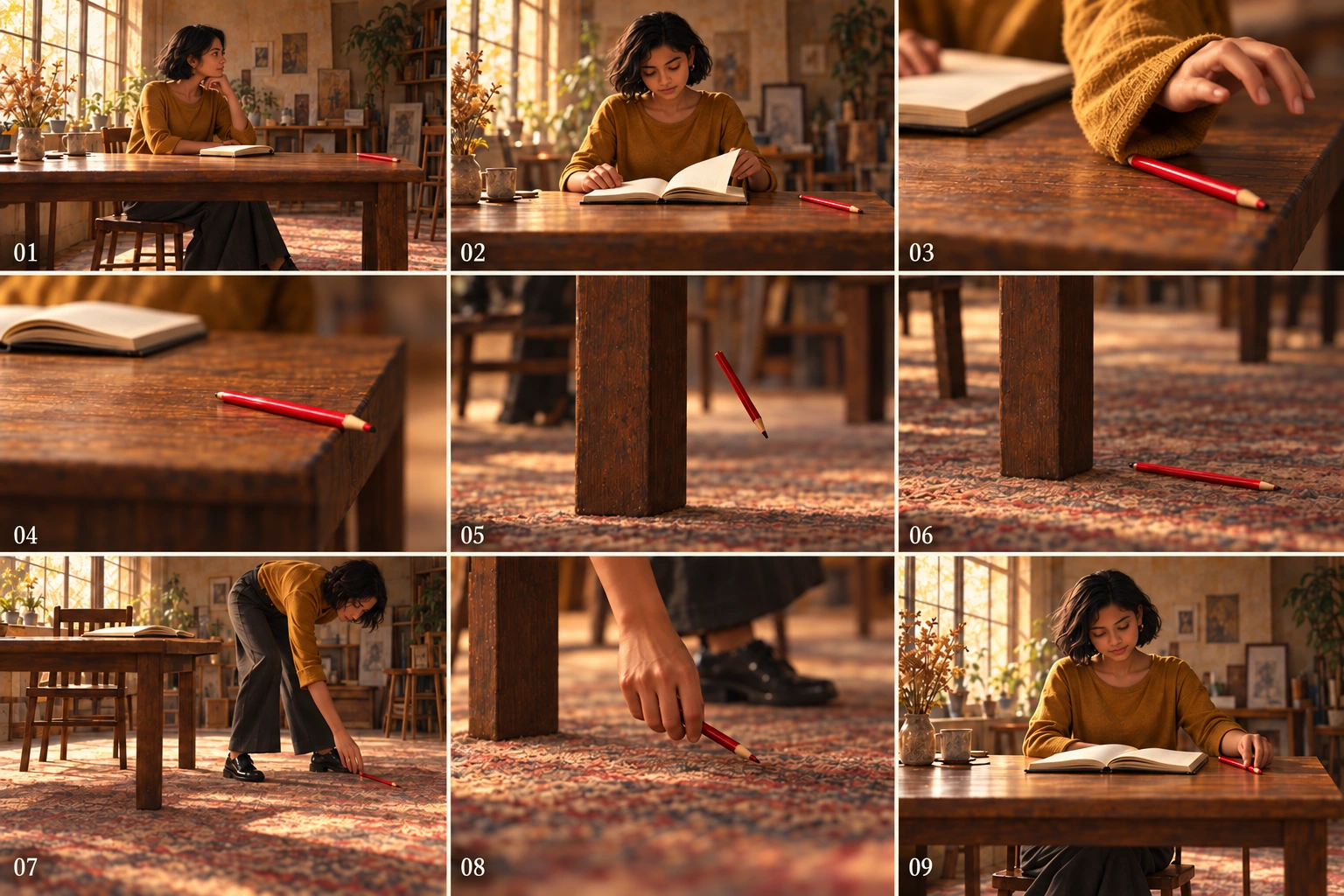
Codex-generated revised teaching sheet. It revises the contact while retaining the falling position and retrieval sequence; it is not an MemeGIF edit or proof of perfectly preserved geometry and camera placement.
In the teaching revision, Panel 08 holds the sole pencil with clear ground; Panel 09 returns Mira to her seat beside the open notebook and one tabletop pencil. Apply the same state checks to MemeGIF candidates.
A better targeted frame does not finish MemeGIF review. Read the entire sequence again before accepting the version.
6. Rebuild individual panels externally when necessary
If a local correction keeps changing acceptable parts of the MemeGIF sheet, move to external composition rather than treating cells as independent editable layers.
Crop a copy of the last accepted MemeGIF sheet externally along actual visible boundaries, not assumed equal pixel coordinates. Preserve actions and labels, or typeset labels separately.
Save the crops in sequence, such as 01-start, 02-open-notebook, through 09-return-pencil. Make or draw a replacement panel separately using the character reference and its specific action brief, then assemble the nine images in an external layout document.
This is manual cropping and composition. It is not an automatic splitting feature of the MemeGIF workflow.
MemeGIF crops contain only their source pixels. Check actual dimensions before enlarging a panel; cropping creates no new detail.
After external assembly, recheck the MemeGIF sequence’s order, gutters, labels, character, and complete pencil path. A correct frame in the wrong slot still tells the wrong story.
7. Hand off a storyboard—not an implied video
Hand off the selected MemeGIF sheet, nine-row action plan, used reference, and unresolved continuity notes. Separate original and accepted versions, and reopen the exported file.
The MemeGIF static sheet proposes actions and views; it assigns no durations, playback, or audio.
For later timing work, see how timed storyboards become animatics. That separate workflow sequences frames and can add audio to test pacing. It does not turn the MemeGIF contact sheet into a finished animated performance.
Nine panels do not mean nine seconds, nine cuts, or nine independently generated high-resolution frames.
Finish MemeGIF review when someone can identify why the pencil fell, follow its landing and retrieval, and confirm its return without duplicates. Keep the written plan available to explain intended framing, but require the pictures themselves to communicate the action.