 MemeGIF
 Character Sheet: GPT-Image-2 Views and Expressions
Create an anime character reference sheet with MemeGIF. Check front, side, and back views, expressions, bag placement, and consistent design details.
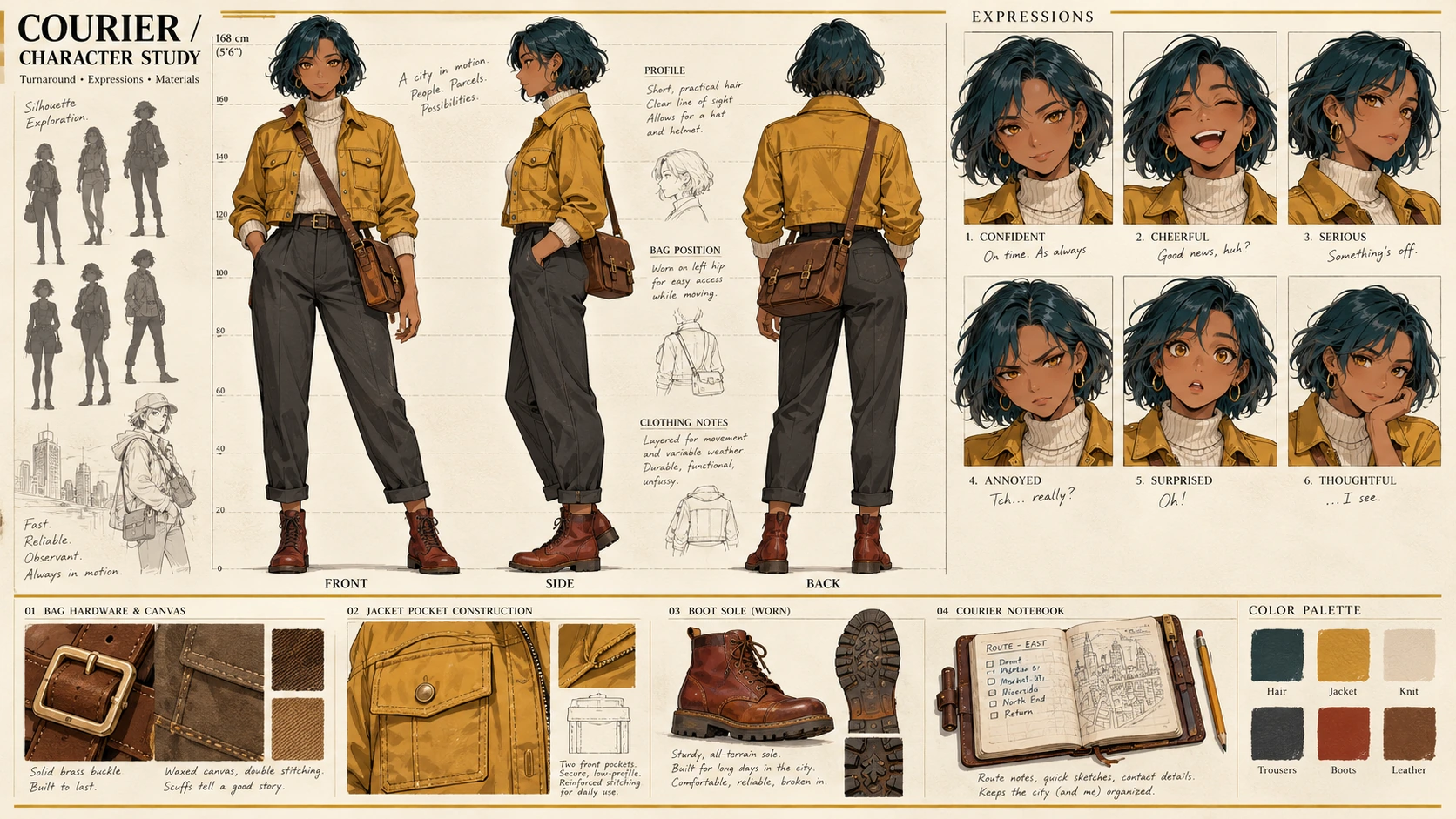
An MemeGIF character reference sheet should help someone draw the same character from different angles. A polished front view is insufficient if the back view moves an accessory or the expressions change the face.
This MemeGIF walkthrough defines one original adult female courier in three full-body views and three expressions. Her bag belongs at her anatomical left hip, appearing on different sides of front and back drawings.
The two images below are Codex-generated teaching illustrations. They demonstrate an error and a correction target; they are not MemeGIF test outputs.
1. Define the character before arranging the sheet
Keep a written specification beside the MemeGIF candidate. Use it to distinguish deliberate design changes from mistakes, especially when a visually attractive variation quietly changes a garment, accessory, or body proportion.
Use this courier specification for your MemeGIF request:
| Part | Design to preserve |
|---|---|
| Character | One original adult female courier |
| Hair | Short, dark-teal bob |
| Eyes | Amber |
| Skin | Warm brown |
| Jacket | Mustard-yellow cropped jacket with two front pockets |
| Underlayer | Cream turtleneck |
| Trousers | Charcoal gray |
| Footwear | Rust-red ankle boots |
| Bag | One brown rectangular crossbody bag at her anatomical left hip |
| Strap | Worn over her anatomical right shoulder, connecting to the bag at her left hip |
Request a neutral standing pose in MemeGIF so clothing and bag construction remain inspectable. Put changes in mood into the expression row rather than changing the full-body poses and obscuring important details.
CLIP STUDIO’s character-design lesson recommends documenting traits and exploring poses and expressions. Apply that approach to the MemeGIF sheet: show personality through the face while retaining hair, clothing, and accessories.
Specify exactly six drawings in the MemeGIF layout:
Top row: FRONT, SIDE, BACK—three full-body views.
Bottom row: NEUTRAL, HAPPY, CONCERNED—three head portraits of the same character.
Leave extra costumes, props, and expressions out of this MemeGIF candidate. A smaller scope makes it easier to compare the defined design without confusing alternatives with approved features.
2. Resolve left and right before writing the prompt
Anatomical left is the character’s own left, regardless of the viewer’s position. Use that rule consistently when writing and reviewing the MemeGIF brief.
In the MemeGIF front view, her left hip appears on the viewer’s right. From behind, it appears on the viewer’s left. The body side stays fixed; the position within the drawing changes.
Use this view-by-view check on the MemeGIF sheet:
| View | Correct bag placement | Strap check |
|---|---|---|
| FRONT | Viewer’s right, at the character’s left hip | From the viewer’s left shoulder toward the bag on the viewer’s right |
| SIDE, facing left | On the character’s visible left hip | Follows the body from the opposite shoulder; it should not become a second bag or switch hips |
| BACK | Viewer’s left, at the character’s left hip | From the viewer’s right shoulder toward the bag on the viewer’s left |
“Viewer’s left” and “viewer’s right” describe positions inside each drawing. They do not identify one permanent side of the complete MemeGIF page.
Do not ask MemeGIF to put the bag “on the left in every view.” That confuses picture coordinates with anatomy and can repeat the same incorrect placement in the back drawing.
Define the MemeGIF side view as a left-facing profile showing her left side. Her nose should point toward that panel’s left edge; a three-quarter pose is a different viewing angle.
3. Generate a candidate from a complete specification
Open MemeGIF to build an original anime character sheet. Start with the 3:4 portrait layout and 1K preset, then enter the complete specification below. Check visible settings before submitting.
These MemeGIF settings and instructions define a request, not a guaranteed result. Save the downloaded candidate and its prompt so revisions can be compared against a known version rather than memory.
Create one 3:4 portrait anime character reference sheet for a single original adult female courier.

Show the same character throughout the sheet. Use clear anime linework, restrained shading, a plain light background, and enough space between drawings to inspect the design.

Character specification:
- Adult woman with consistent adult body proportions.
- Warm brown skin.
- Amber eyes.
- Short dark-teal bob haircut, with the same length and silhouette in every view.
- Mustard-yellow cropped jacket with exactly two front pockets.
- Cream turtleneck underneath.
- Charcoal-gray trousers.
- Rust-red ankle boots.
- One brown rectangular crossbody bag.
- The bag is always worn at her anatomical LEFT hip.
- Its strap is worn over her anatomical RIGHT shoulder and connects to the bag at her left hip.

Layout:
Use two rows.

TOP ROW:
Exactly three full-body drawings, arranged left to right and labeled:
FRONT
SIDE
BACK

Keep the figures at the same scale, in a relaxed neutral standing pose, with aligned head heights and a shared ground level. Show the entire head and both feet. Keep the arms positioned so the clothing and bag can be inspected.

FRONT:
Face the viewer directly.
The bag at her anatomical left hip appears on the VIEWER'S RIGHT.
The strap runs from the VIEWER'S LEFT shoulder toward the bag on the VIEWER'S RIGHT.

SIDE:
Show a strict left-facing profile, with her nose pointing toward the left edge of the panel.
Show her left side, with the bag on the visible left hip.
Keep the bag's placement and construction consistent with the front and back views.
Do not substitute a three-quarter view.

BACK:
Show her directly from behind, including the back of her hair and clothing.
The bag at her anatomical left hip appears on the VIEWER'S LEFT.
The strap runs from the VIEWER'S RIGHT shoulder toward the bag on the VIEWER'S LEFT.
Do not place the bag on the viewer's right in this view.

The viewer-left and viewer-right instructions apply within each individual view, not across the entire page.
Rotate the character between views; do not simply mirror a drawing.

BOTTOM ROW:
Exactly three head portraits at matching scale, arranged left to right and labeled:
NEUTRAL
HAPPY
CONCERNED

NEUTRAL: relaxed eyebrows and a resting mouth.
HAPPY: a warm smile and relaxed, lifted expression.
CONCERNED: slightly knitted brows and a worried mouth.

Preserve the same face shape, bob haircut, skin tone, and amber eye color across the portraits. Change the expression, not the character's identity.

Keep clothing colors, garment lengths, pocket construction, boot shape, bag shape, and strap attachment consistent wherever visible.
Allow normal occlusion: do not show front jacket pockets through the back of the jacket.

Render each of the six labels exactly once, clearly separated from the artwork.
Do not add a fourth expression, extra views, extra bags, alternate outfits, logos, speech bubbles, or background scenes.
4. Inspect six drawings—not one attractive page
Inventory the MemeGIF page: three full-body views, three expressions, and six correct labels. Confirm complete figures and a genuine side profile before judging the artwork’s overall appeal.
Then compare the MemeGIF design across individual panels.
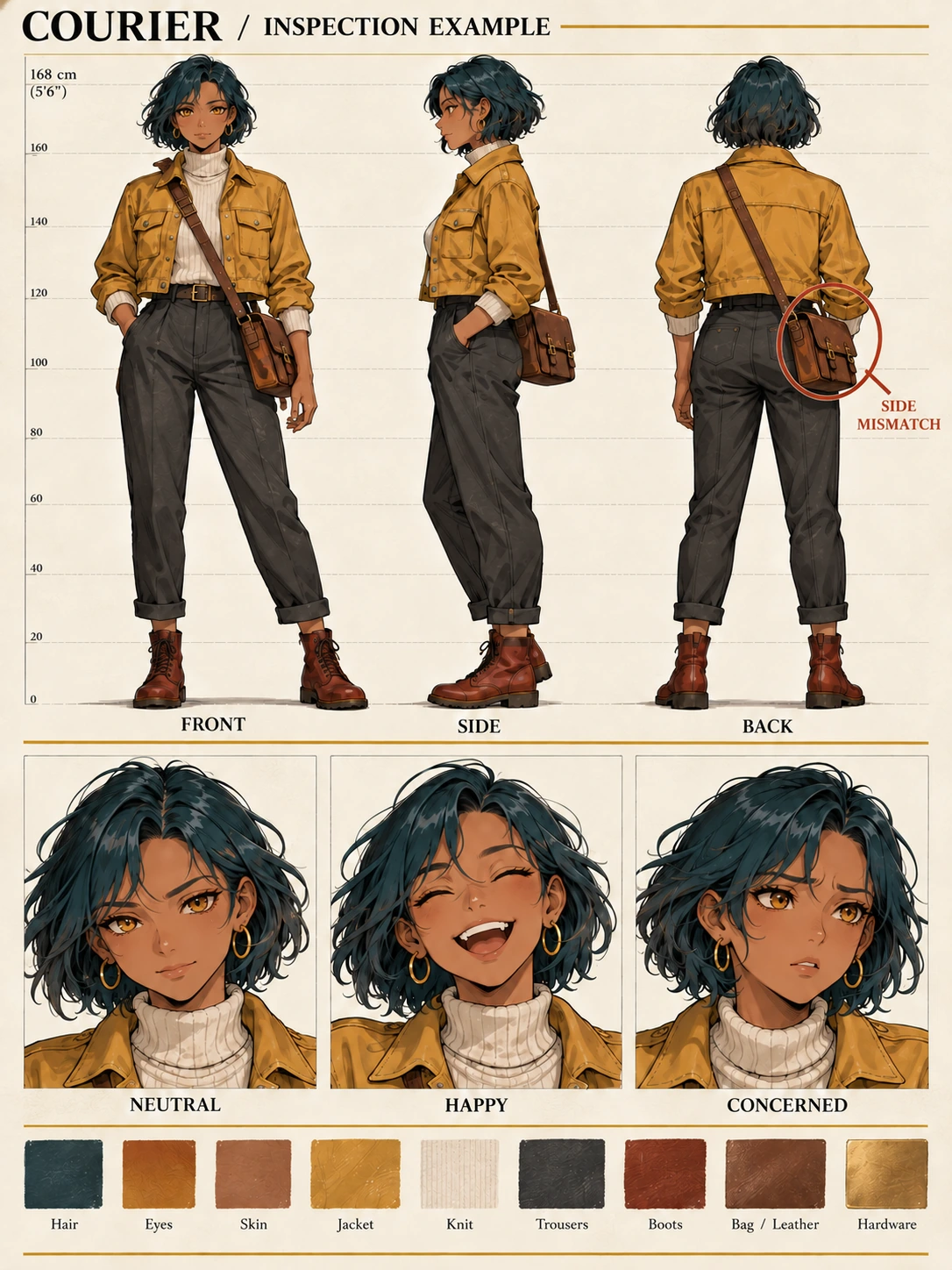
Codex-generated error-identification illustration, not an MemeGIF test output. The front-view bag placement is correct; the back-view bag is on the wrong side.
Follow the bag and strap
The teaching front view places the bag on the viewer’s right, matching her anatomical left hip. Use that relationship when inspecting your MemeGIF candidate; do not infer correctness from the page’s symmetry.
The teaching back view also puts the bag on the viewer’s right. That is the error. In your MemeGIF review, the back-view bag should appear on the viewer’s left.
Trace one coherent strap from shoulder to hip in each MemeGIF view. Correct bag placement is insufficient when the strap is disconnected, duplicated, or attached to the wrong shoulder.
Compare body landmarks
Compare head, shoulders, jacket hem, hips, knees, and boot soles across the MemeGIF full-body row. Differences should follow the viewing angle rather than redefine body shape or garment length.
GraceGit’s turnaround section on CLIP STUDIO TIPS carries features between views with guide marks. Compare your MemeGIF sheet similarly using temporary horizontal guides in an external editor, not an assumed platform feature.
Matching head and foot heights alone do not prove MemeGIF consistency. Also inspect torso length, leg proportions, and jacket cut across the views.
Check clothing where it should be visible
The jacket has two front pockets. In the MemeGIF back view, they must not reappear as identical back pockets merely because the generator repeated the front design.
Review turtleneck height, jacket hem, trousers, boots, and bag proportions in MemeGIF. Colors should remain recognizable rather than becoming different materials or hues between drawings.
Check expressions without accepting a new face
The bottom row contains only NEUTRAL, HAPPY, and CONCERNED.
Compare face shape, bob silhouette, skin tone, and eyes across MemeGIF portraits. Eyebrows and mouth can express mood; the happy and concerned faces should retain the same underlying character design.
Review any MemeGIF portrait that looks appealing alone but no longer matches its neighbors. Evaluate the set together before approving one convincing expression.
5. Revise one defined error
Save the original MemeGIF candidate. Use a defined mismatch to revise a character reference image with visual context rather than redescribing the entire character from scratch.
Treat the bag and connected strap as one accessory correction in MemeGIF. Moving only the bag leaves the design unresolved when its strap still follows the old path.
Use a focused request such as:
Edit the uploaded courier character sheet.

Correct the crossbody bag placement and connected strap in the BACK view only.

The bag belongs at the character's anatomical LEFT hip.
Because this is the back view, place the brown rectangular bag on the VIEWER'S LEFT within the BACK panel.
Route the strap from the VIEWER'S RIGHT shoulder down toward that bag.

Remove the incorrectly placed bag on the viewer's right and the incorrect strap path.
Restore the clothing where those incorrect elements were removed.
Keep only one bag in the BACK view.

Preserve the FRONT view, the left-facing SIDE view, and all three expression portraits.
Preserve the character's hair, face, skin tone, clothing, proportions, colors, and the six labels.
Keep the original 3:4 page layout.

Do not mirror the whole sheet or flip the entire BACK drawing.
Do not add accessories or redesign the outfit.
This MemeGIF request describes an edit; it does not lock the other panels. Review the entire revised sheet, including faces, clothes, labels, and proportions, rather than only checking the corrected hip.
The next teaching image illustrates the target for your MemeGIF review.
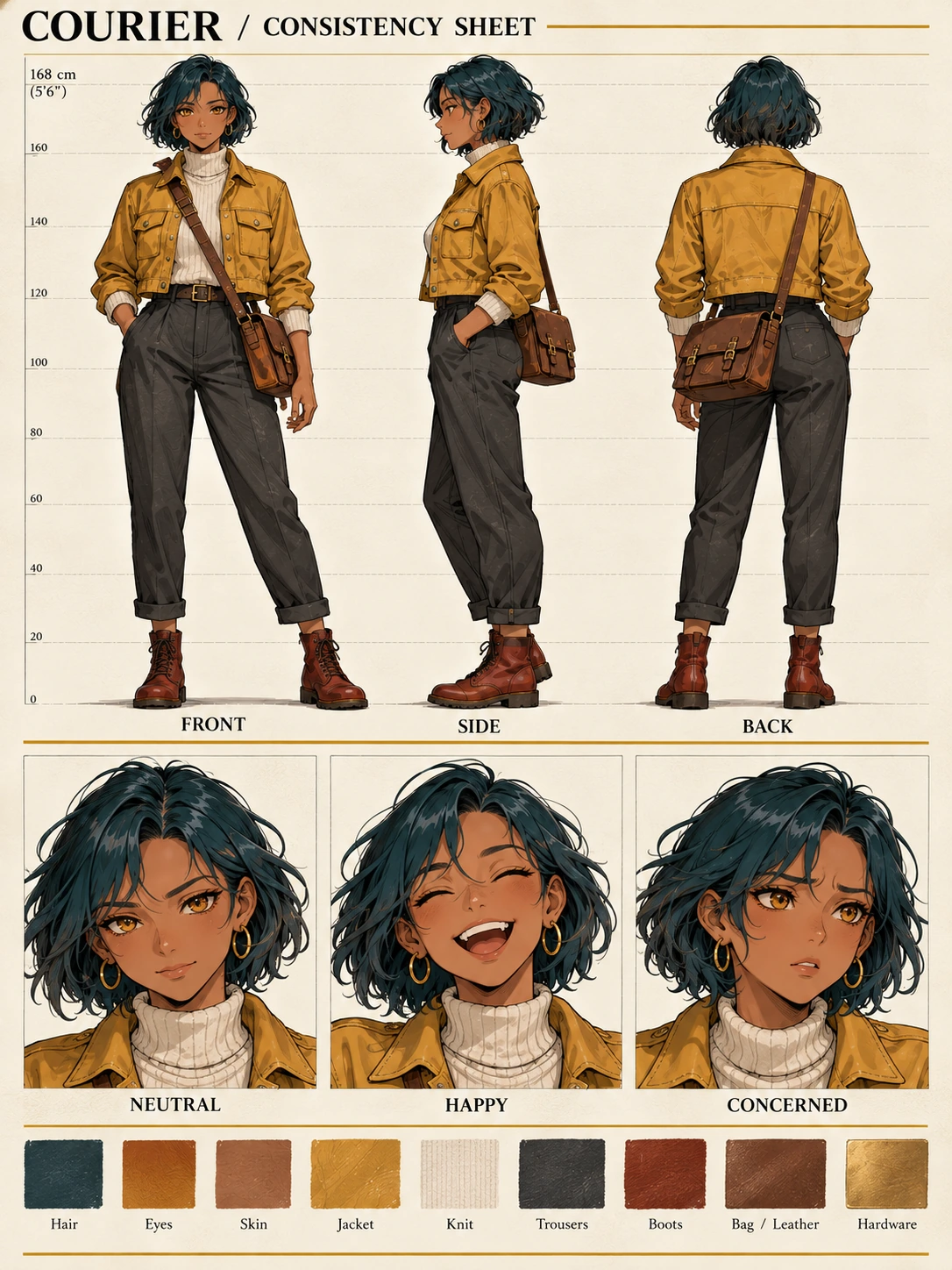
Codex-generated correction-target illustration, not an MemeGIF test output. In BACK, the bag is on the viewer’s left and the strap runs from the viewer’s right shoulder toward it.
Both views should express right shoulder to left hip using the character’s anatomy. The illustration explains that rule for MemeGIF review; it does not prove a particular revision will produce these exact pixels.
Choose a fallback that matches the remaining problem
| Problem | Next action |
|---|---|
| The side view is still three-quarter rather than profile. | Request a correction to SIDE, explicitly specifying a left-facing 90-degree profile. Recheck the bag and proportions afterward. |
| The bag moves correctly, but the strap is duplicated or disconnected. | Revise the accessory construction as one issue, removing the obsolete strap and retaining one coherent path. |
| The face or outfit changes during the bag correction. | Return to the saved candidate. Do not adopt the new face or clothes simply because the bag improved. Use an external editor when preserving the accepted panels precisely is essential. |
| A view or expression is missing, or labels overlap the drawings. | Work on the missing drawing separately from an approved reference, then assemble the page and add labels in an external editor. Check consistency before accepting the replacement. |
| Small details are unclear. | Inspect the actual downloaded pixels. Use a separate detail drawing when necessary, and label it as an additional reference rather than assuming enlargement resolves the ambiguity. |
Avoid flipping an entire MemeGIF back drawing as a shortcut. That changes every asymmetric feature in the panel, including details that were already correct, rather than correcting only the bag.
6. Reuse an approved reference with its written rules
Save an accepted MemeGIF sheet separately from earlier candidates. Do not mix the known bag-side error into a folder of equally “final” versions that a collaborator could mistake for approved guidance.
For later MemeGIF poses or scenes, provide the accepted sheet and repeat its essential constraints. Keep a compact written reference note alongside the image:
Original adult female courier. Preserve the short dark-teal bob, amber eyes, warm brown skin, mustard cropped jacket with two front pockets, cream turtleneck, charcoal trousers, and rust-red ankle boots. The single brown rectangular crossbody bag is worn at her anatomical left hip, with its strap over her anatomical right shoulder.
Add a new MemeGIF task separately, such as walking or a close-up. Keep the retained design rules distinct from the requested pose, framing, or scene changes.
A reference makes the MemeGIF intention explicit, not automatically consistent. Inspect each new result, especially when rotation or occlusion changes how much of the bag and strap is visible.
When a new MemeGIF view exposes an undefined area, decide and record its design. Do not adopt the generator’s interpretation as an already approved fact without reviewing it.
7. Prepare a clear handoff
Retain the full-size approved MemeGIF file. You can size a character sheet for sharing while preserving its 3:4 proportions; choose the recipient’s needs without changing the canvas shape.
Reopen the resized MemeGIF sheet. Check all six labels, complete heads and boots, and clear accessory placement at the recipient’s viewing size. Avoid stretching the page to fit an incompatible presentation area.
Deliver the MemeGIF image with its written specification and anatomical-left bag rule. Identify unresolved details explicitly so collaborators can follow the accepted design rather than guess from conflicting pictures.
Before accepting the MemeGIF sheet, check:
- All three full-body views and all three expressions are present and correctly labeled.
- The character’s proportions, face, hair, clothing, and colors agree across the drawings.
- The bag remains at her anatomical left hip, with the shoulder-to-hip strap route correct in each view.
- The shared file is legible, complete, and clearly identified as the approved version.
A checked MemeGIF character sheet is a visual reference, not a rigged model or layered drawing. It helps someone follow clear design decisions while exposing unresolved issues; later images still need their own review.